One-Sentence Summary
This app enables users to join existing Zoom meetings inside an embedded experience while all authentication and meeting control remain fully managed by Zoom.
Overview
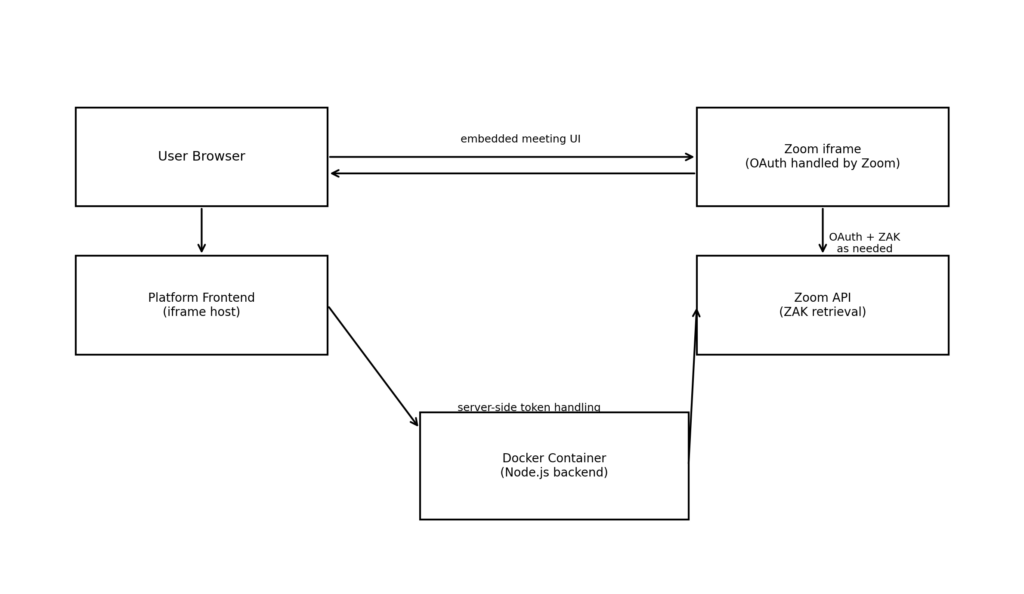
This Zoom Marketplace app allows users to join existing Zoom meetings within our platform via an embedded iframe.
The app is implemented as a Node.js server application packaged as a Docker container. It integrates with Zoom solely to support the in-iframe OAuth
join flow, including retrieval of a temporary Zoom Access Key (ZAK) when required.
The platform does not authenticate, identify, or track Zoom users. Users may be anonymous from the platform’s perspective. Any Zoom authentication occurs
entirely within the embedded Zoom experience and never posts data back to the parent site.
All Zoom meetings are created, scheduled, and started externally using Zoom’s standard desktop or web client.
Architecture Diagram
Adding the App (Required)
Prerequisites
· A Zoom account with permission to create Server-to-Server OAuth apps
· Zoom account owner or admin access
· Ability to deploy a Docker container
Step-by-Step Instructions
- Create a Server-to-Server OAuth App
1. Sign in to the Zoom App Marketplace
2. Navigate to Develop → Build App
3. Select Server-to-Server OAuth
4. Complete the required app details
5. Activate the app
- Configure App Scope Enable the following scope:
o user:read:zak – Required to allow Zoom to retrieve a temporary Zoom Access Key during the meeting join flow
- Obtain App Credentials After activation, Zoom provides:
o Client ID
o Client Secret
- Deploy the Docker Container Start the container with the required environment variables:
# Zoom OAuth Configuration (Required for OAuth token handling)
ZOOM_CLIENT_ID=your_zoom_client_id_here
ZOOM_CLIENT_SECRET=your_zoom_client_secret_here
- Verify Installation
o Embed an existing Zoom meeting
o Confirm Zoom authentication occurs inside the iframe
Troubleshooting
· Ensure the app is activated in the Zoom Marketplace
· Confirm the user:read:zak scope is enabled
· Verify the Production Client ID is used
· Restart the container after configuration changes
Using the App (Required)
How the App Works
1. A user opens an embedded Zoom meeting
2. Zoom handles authentication entirely within the iframe
3. Zoom retrieves a temporary ZAK if required
4. The user joins the meeting inside the platform
The platform does not receive or store Zoom user identity, OAuth tokens, or ZAK values.
Prerequisites for Usage
· A valid Zoom Meeting ID
· The meeting already exists in Zoom
· The meeting host has started the meeting using Zoom
Limitations
This app does not: – Create, start, or schedule meetings – Authenticate Zoom users at the platform level – Track Zoom user identity – Persist Zoom data or tokens
Removing the App (Required)
How to Remove the App
1. Sign in to the Zoom App Marketplace
2. Navigate to Manage → Apps
3. Locate the Server-to-Server OAuth app
4. Select Deactivate or Delete
Impact of De-Authorization
· Embedded meetings will stop loading
· Zoom OAuth and ZAK retrieval will fail
· All API access is revoked
Data Handling After Removal
· No Zoom data is retained
· All temporary tokens are discarded
· Removing the container clears all runtime state
Privacy & Data Usage
Data Access
· Temporary Zoom Access Keys (ZAK), retrieved by Zoom during join flow
Data Storage
· No Zoom user data is stored
· No ZAK values are persisted
· No meeting content (audio, video, chat, recordings) is stored
Data Sharing
· Zoom data is not shared with third parties
· No Zoom authentication data is passed to the parent platform
Security
· Credentials are provided via environment variables at container startup
· Tokens exist only in runtime memory
· The app follows Zoom Marketplace security requirements